
Why WhatsApp:
- Attention moat: near-instant opens and higher response rates than email/portals.
- Zero learning curve: your learners already live on WhatsApp.
- Operational fit: perfect for reminders, links, resources, doubt tickets, attendance nudges, certifications, and fee follow-ups.
- Privacy controls: you choose between “announcement-only” groups (low noise) and one-to-one broadcasts (full privacy).
You can implement this directly on WhatsApp using this guide — or let us handle it for you with an easier automation platform Contact Us.
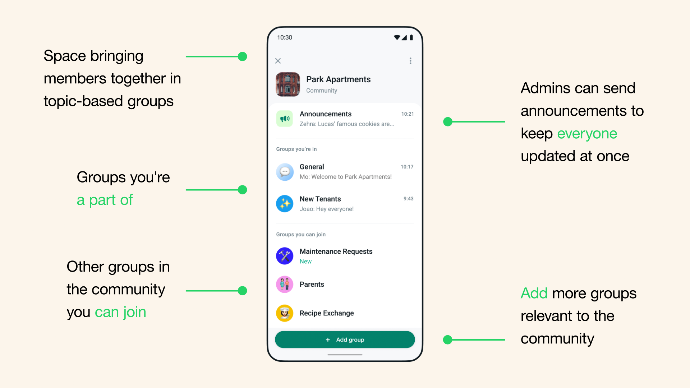
Communities let you organise multiple groups and reach everyone via an Announcement Group where only admins can post.
Who should use this:
1) Cohort Programs (live Zoom/Meet classes)
- Announcements: class links, timing, replay, homework.
- Q&A: moderated group or 1:1 support line.
- Attendance: pre-class pings; post-class recap.
- Weekly rhythm: Monday schedule, mid-week nudge, weekend assignments.
2) Recorded Courses + Live Doubt Clinics
- Drip unlocks: module links + quizzes.
- “Clinic reminder” broadcasts with calendar hold.
- Auto feedback → tag learners for follow-ups.
3) High-ticket Coaching / Masterminds
- Concierge support thread (1:1).
- Accountability check-ins (habits, KPIs).
- Session prep forms → coach sees replies before call.
4) Bootcamps & Challenges (5–30 days)
- Daily challenge drops at fixed time.
- Streak tracking via quick replies (“/done”, “/miss”).
- End-of-program certificate delivery on WhatsApp.
5) Admissions & Fees
- Application status & document checklist.
- Payment links, receipts, and friendly follow-ups.
- Segmentation: leads vs enrolled vs alumni (Labels/API).
The Building Blocks (pick your privacy + control)
Purpose | Best WhatsApp Primitive | What learners see | Notes |
| All-hands updates | Community → Announcement Group | Admin posts only; replies are limited/collapsed | Ideal for batch-wide updates. |
| Peer discussion | Normal Group (moderated) | Everyone can talk | Use sparingly; set rules & quiet hours. |
| Doubts / tickets | 1:1 chat or Helpdesk number | Private chat | Use Quick Replies/Labels (App) or flows (API). |
| Full privacy broadcasts | Broadcast List (App) | 1:1 messages | Learner must save your number to receive. |
| Scalable automation | WhatsApp Business Platform (API) | 1:1 templated messages | Best for reminders, drip, receipts, certs. |
Ops SOPs that keep cohorts calm:
Cadence
- T-15 min: “Class starts in 15m → [Join Link]”
- T+5 min: “Recording will be uploaded by 10pm. Qs? Reply ‘HELP’.”
- Daily 9pm: “Day #7 assignment → [Doc]. Reply ‘DONE’ when submitted.”
Message design
- One outcome per message; always lead with the verb: Join / Watch / Submit / Pay / Confirm.
- Pin weekly schedule + rules in the Announcements group.
- Keep links short and consistent; use the same link button text each time.
Moderation
- Announcement group = admin-only posts.
- If you run a Q&A group, set hours (e.g., 7–9pm); outside hours → auto-reply routes to 1:1 support.
Labeling (non-API path)
- Labels: Lead, Enrolled, Batch-Oct-2025, Fee-Pending, Alumni.
- Quick Replies: /link, /replay, /fee, /help, /policy.
Compliance & consent
- Get opt-in at purchase/registration.
- Offer a simple “STOP” keyword to opt out (and honor it).
- Avoid sending fees/links to non-consented leads on the App; use API templates if at scale.
Ready-to-paste message templates
Welcome (on enrollment)
“🎉 Welcome to Leadership Sprint — Oct 2025.
All updates come here. Save this note.
- Live class: Mon–Fri, 7:30–8:45 PM IST
- Replay by 10 PM
- Doubts: message Support at this chat → +91-XXXXXXXXXX”
Pre-class reminder (T-15)
“⏰ Class in 15 min. Click to join: [Zoom link]
Keep notebook ready. Today: ‘Framework X’.”
Replay drop
“▶️ Replay ready: [link] — Expires in 7 days.
Homework: Q1–Q3 here → [Doc]”
Soft fee nudge
“🙏 Quick reminder: fee #2 due today.
Pay link: [link].
Need time? Reply HELP and we’ll sort it out.”
Certificate delivery
“✅ Congrats! You completed Leadership Sprint.
Download your e-certificate: [secure link]”
Things to remember (save this)
- Noise control wins trust. Keep Announcements clean; push discussion to 1:1 or timed Q&A.
- Consistency beats intensity. Same times, same headers, same emojis.
- Privacy expectations. Groups/Communities show group context; for true 1:1 privacy at scale use Broadcast/APIs.
- Backups. Export chat monthly; store schedules/resources in Drive with stable links.
- Single source of truth. One Announcements group per batch; never split.
End-to-end “Best Example” Blueprint (30-day Cohort)
Stack
- Announcements (Community) → schedule, links, replays.
- Support (1:1) → tech/pay/doubt triage.
- Optional Q&A group (moderated, 60-min window nightly).
- For scale: API automations for reminders, receipts, certs.
Day 0
- Add learners to Community; post Welcome Pack (rules + calendar + link hygiene).
- Pin schedule + support contact.
Daily (D1–D30)
- T-15 → Reminder (Announcements).
- T+5 → Housekeeping (recording ETA + homework doc).
- 9pm → Assignment push + streak check.
- Support resolves tickets 1:1; tricky Qs copied (anonymized) into next day’s lecture.
Weekly
- Friday survey (3 questions → NPS + blocker + topic vote).
- Saturday digest: wins/screenshots + next week’s plan.
Graduation
- Certificates sent on WhatsApp; Alumni label applied; invite to Alumni Announcements.
Step-by-Step Setup Guide (put last, with videos)
Follow the App path for smaller cohorts; switch to the API path when you need scale, full privacy broadcasts, analytics, or CRM workflows.
A) App Path — WhatsApp Business (free)
1) Set up WhatsApp Business profile
- Install WhatsApp Business → complete profile (brand name, logo, description, hours).
- Add Greeting (first-time auto-hello) & Away messages (off-hours).
- Create Quick Replies (/link, /replay, /fee, /help).
Watch & follow
- Quick Replies (how-to):
- Greetings/Away/Quick Replies:
2) Organize with Labels
- Create labels for lifecycle & batches: Lead, Enrolled, Batch-Oct-2025, Fee-Pending, Alumni.
- Color-code and apply on chats/contacts.
- Filter inbox by label during outreach or fee follow-ups.
Watch & follow
- Labels on WhatsApp Business (official):
- How to create & use labels:
3) Create a Community with an Announcement Group
- New Community → name = “Course-Name • Batch-Month”.
- Inside it, create Announcement Group (admin-only posts).
- Pin Rules + Weekly Schedule; post Support Contact.
- Optional: Add Q&A / Assignments sub-groups later.
Watch & follow
- What are Communities? (official):
- Connect related groups (official playlist): Playlist for managing community
- Create a Community (Help Center step-by-step): https://faq.whatsapp.com/438859978317289
- About Announcement Groups (what they do): https://faq.whatsapp.com/582420703681043
4) Lock down noise (Announcement settings)
- In Group settings → Send messages → Only admins.
- Post format: [DAY #] Title → 1 link → 1 CTA.
- Use Polls sparingly (attendance, slot preference).
Watch & follow
- Announcement group explainer:
5) Broadcast without a roster (optional)
- Use Broadcast Lists for fully private 1:1 sends (note: recipient must save your number).
- Keep lists <256 contacts; segment by batch.
B) API Path — WhatsApp Business Platform (for scale)
1) Choose a BSP or platform like us
- Pick a provider (e.g., your preferred BSP/CRM) that supports: template messages, flows, inbox, webhooks, automation, and analytics. You can checkout our playlist of AI CRM features we offer to you Playlist.
Watch & follow
- WhatsApp Business API explained:
2) Set up templated messages & journeys
- Create templates: Reminder_15min, Replay_Drop, Fee_Nudge, Certificate_Send.
- Map triggers: purchase → welcome; class calendar → reminders; LMS events → replay; payment success → receipt; completion → certificate.
Watch & follow
- End-to-end API intro/course:
3) Route doubts to inbox & tag outcomes
- Auto-reply “HELP” → opens a ticket, assigns to agent, applies Doubt-Open label; resolved → Doubt-Closed.
- Weekly export for coaching team insights.
4) Respect windows & consent
- Use 24-hour session messages for open conversations.
- Use approved templates for nudges outside 24h.
Quality checklist (before you add the first student)
- Business profile complete; logo clear at 1:1 scale
- Community created; Announcement group pinned rules/schedule
- Support number tested; Quick Replies live
- Labels created & color-coded
- Day-1 to Day-7 messages drafted and reviewed
- API templates (if using) approved and mapped to triggers
- Backup/export SOP monthly
Bonus: your first week (copy-paste plan)
- Sun: Welcome pack + Calendar + House rules
- Mon–Fri (T-15): Join ping; (T+5): replay ETA + homework
- Wed: Mid-week nudge “What’s one win?”
- Fri: 3-Q survey + next-week preview
- Sat: Digest (wins + screenshots) + Assignment list
Drop a comment with:
- What was unclear or missing
- Sections that need more examples/templates
- Tips from your own WhatsApp cohort runs
Thanks for helping make this guide better!